Choose your pet
Start with the default snow leopard for an image, or upload a clear photo of your cat or dog. One animal, facing the camera, with its face and front paws visible.
A little paw. A lot to say.
It is a snow leopard meme and pet video generator. Give the snow leopard your words, or upload one photo of your cat or dog and watch it lean in for attention.
Make yours1 free image credit when you sign up · No subscription
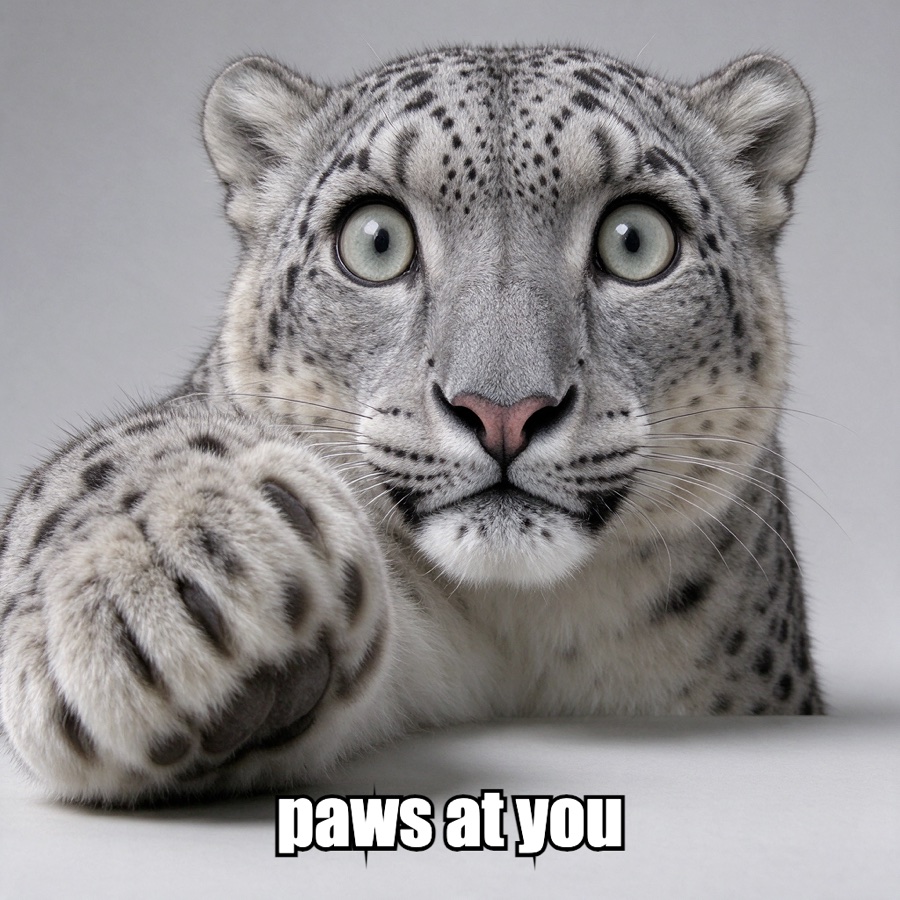
AI snow leopard image example
One text prompt · 1 credit
A real generated image, not a pet-photo before/after and not a video sample. The free meme maker bundles eight AI pet templates and can caption a photo from your device without uploading it.
Choose an image meme or bring your pet to life in a video. Both start with the same soft, needy paw-at-the-lens energy.
Make yours
Reference music (optional)
MP3, M4A, WAV or OGG up to 20 MB. The clip uses this track as its soundtrack reference. Leave empty for a silent clip.
Sign in to keep your creation and use credits.
Your photo is used as the identity reference. Results vary from the samples; no two pets render exactly alike.
Start with the default snow leopard for an image, or upload a clear photo of your cat or dog. One animal, facing the camera, with its face and front paws visible.
Add your message or an optional instruction. Pick both paws, one paw, or the big-eyed snow leopard look, then add an optional reference track.
Your creations appear in My images and My clips. Download the result when it is ready, and post it wherever your friends will see it.
Paws at You is a small, specific idea: a pet gets very close to the camera, looks at you with far too much hope, and reaches out one paw as if to ask for something. In late October 2026, a close-up snow leopard with huge round eyes became a reaction image for exactly that feeling, captioned with game invites, apologies, and requests for attention.
This site turns that gesture into a tool. The image mode gives you a snow leopard and lets your caption do the talking. The video mode uses one photo of your own cat or dog as the identity reference, then animates the lean-in, the paw, and the hold. The result is a new clip, not a face swap onto stock footage, and it keeps your pet’s fur, markings, ears, and face colour as close as the model can.
It is meant for the group chat, a pet account, or a birthday message. Pick a mode, add one photo or one line, and let the pose preset handle the rest. Start with the creator when you are ready.
Every generation is a short, guided job, not a chat interface. For a video, upload one framed photo of your pet and choose a pose. The result is a ten-second vertical MP4 with no audio track, so you can add your own sound when you post it. You do not need to write a prompt or direct the scene; the pose preset handles the lean, the reach, and the settle back.
For an image, type a caption and an optional direction. The caption is added as text after the snow leopard image is generated, so the spelling and line breaks stay exactly as you typed them. You can change the caption before downloading without generating the image again.
Both modes use credits instead of a subscription. A credit is used when the job starts. If generation fails, the credit returns automatically. Results stay in your account, so refreshing the page or opening it on another device does not lose a paid result.
The image mode is the fastest way to get the joke. It starts from a snow leopard, accepts a short caption and an optional direction such as a tiny crown or warm lamp light, and returns a square PNG. It costs one credit, and the first image credit is free when you sign up. Use it when you want a reaction image, a profile picture, or a caption that is funnier than the picture itself.
The video mode is for your own pet. Upload one photo, choose a pose, and the model performs the stare, the lean, the reach, and the settle back. “Both paws” is the closest match to the original meme; “one paw” is a lighter tap; “snow leopard look” gives a cat or dog oversized round eyes while keeping its own markings. Video costs five credits and is rendered at 720p and ten seconds, silent unless you add reference music.
If you are unsure, start with the image: it is cheaper, quicker, and easier to caption. Move to video when the photo is clear and you want the actual paw motion. A front-facing pet with visible eyes and front paws works best.
One animal, one clear face. The best source photo is taken in daylight or a bright room, with your pet looking roughly toward the camera. The eyes should be visible and the front paws should be in frame. You do not need a costume or a special pose; the effect adds the lean and the reach. Avoid sunglasses, stickers, heavy filters, group photos, and hands holding the pet.
A normal phone photo is enough. The upload accepts JPG, PNG, and WebP up to 10 MB, then frames it as a vertical 9:16 image. If the face is small in the original, crop closer before uploading; if the paws are hidden, choose a different photo. The model preserves fur colour and markings best when the light is even and the animal is not moving.
Only upload a photo of a pet you own or have permission to use. One cat or one dog in the frame gives the clearest result; group photos, people, or large brand logos are more likely to distract the effect. The output is a fictional performance, not footage of a real event.
The tool uses a simple credit balance. New accounts receive one image credit. Image generation costs one credit; a ten-second video costs five. Packs are one-time purchases, not subscriptions, and credits from packs are valid for 365 days. The price is shown before you generate, and a failed generation returns the credit automatically.
Your source photo is uploaded only when you start a video job. It is stored with your account so the result can be recovered, and your generated images and clips appear only in your signed-in history. The image generator does not need a pet photo at all. Signed-out visitors are asked to sign in before they can open My images or My clips.
Keep the output kind: do not present a generated clip as real footage, use someone else’s pet without permission, or make content that harasses an animal or a person. If a photo cannot be used, the job fails and the credit is returned.
The obvious use is a game invite: “paws at you, can you play?” The same clip works as a good-morning message, a gentle apology, or a nudge for a friend who is ignoring the group chat. Make a small set with different captions for a pet account, or put a birthday pet’s name in the image. The tool does one gesture well.
Paws at You is an independent AI pet meme and video generator. It makes a snow leopard meme image with your caption, or turns one photo of your cat or dog into a short clip where your pet leans toward the camera and reaches out a paw.
Sign in, upload one clear photo of your cat or dog, choose both paws, one paw, or the snow leopard look. The pose preset renders a ten-second vertical clip. You can close the page while it works and find the result in My clips.
No. The AI image generator starts with a default snow leopard, so you can type a caption and an optional direction without uploading anything. The free meme maker also has eight AI pet templates and can caption a photo from your device without uploading it. To animate your own pet, use the video tab.
Only if the owner has given you permission. One cat or one dog in the frame gives the clearest result; photos with people or several animals are more likely to confuse the effect.
Image generation is usually quick; video takes longer because the model renders every frame. You can leave the page after starting a job. The result appears in your history when it is ready, and failed generations return their credits automatically.
One snow leopard image costs 1 credit; one ten-second 720p pet video costs 5 credits. Packs start at $5.99, there is no subscription, and new accounts receive one image credit.
No. It is an independent tool inspired by the paw-reaching animal meme, not affiliated with TikTok, any zoo, or the creator of the original clip. Results vary from the reference image.